
Capture screenshots and webcam images ScreenAudit is a simple application that allows you to grab screenshots from your desktop or webcam at regular intervals. However, ScreenAudit is not designed to be a security or surveillance application but rather to track business activity. It's ideal for those that need to track employees remotely or need to make sure that their efforts are justly rewarded by their employer.
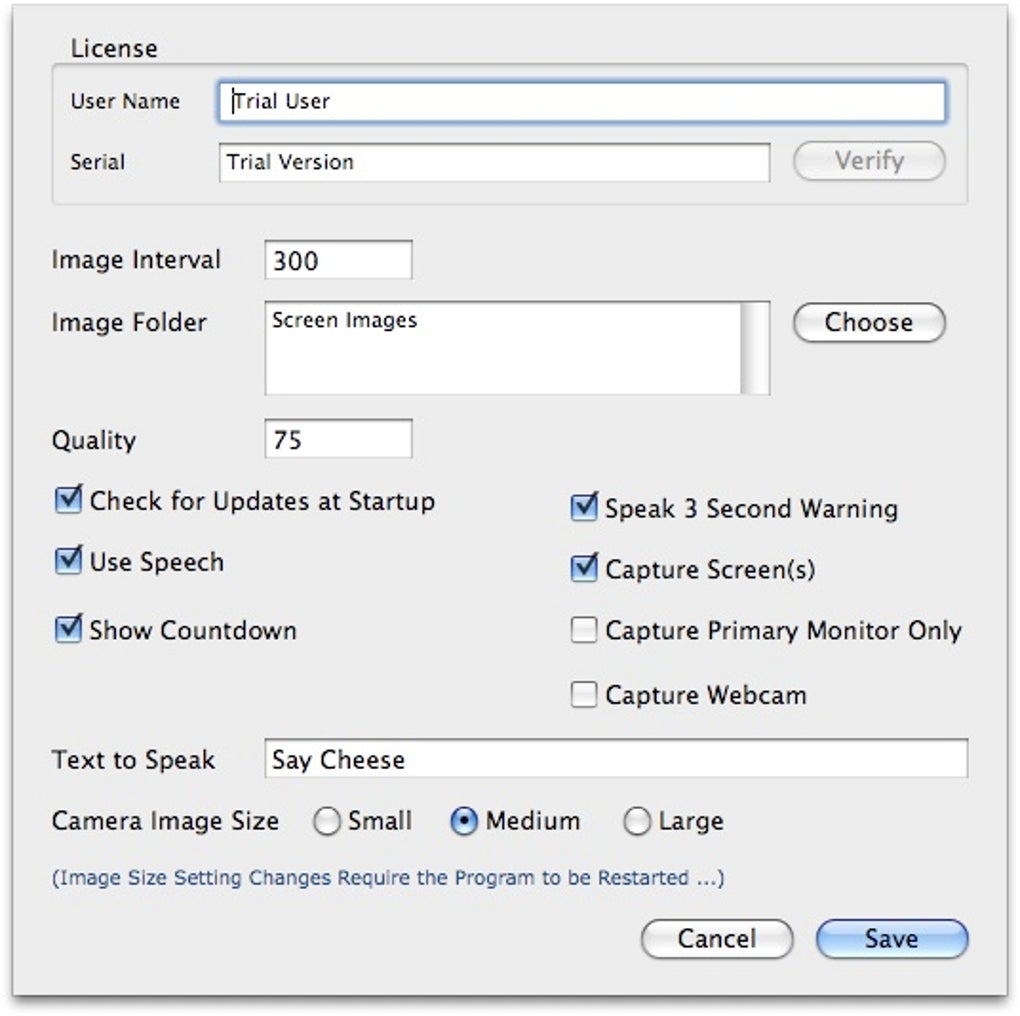
You may also like 2.8 Free Snip Capture and annotate screenshots 3.4 Trial version Snagit A great productivity aid in creating guides 4.7 Free Monosnap Capture, annotate, and share with ease You have full control over how regularly ScreenAudit takes shots of your screen and you can choose the path of the target folder into which the grabs are saved. You can also be alerted to when a screen shot or webcam shot has been taken via audio alert. This even extends to allowing you to define a sentence or phrase that will be "spoken" to you just before a picture is taken.
If you need only part of the screen or webcam image grabbing, you can define the size of the screenshot taken. There are many other features and benefits of ScreenAudit worth mentioning including the fact that it comes with ArtenView to help find and view your images, it supports use over multiple monitors and it can save images to a slideshow or Quicktime Movie. ScreenAudit is a useful utility for anyone that needs to regularly monitor their desktop usage or use their webcam to keep an eye on things.







